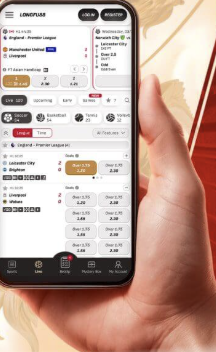
Longfu88 on Mobile – No APP, Full Browser Access for Malaysia
There is no longfu88 APP available for download and no longfu88 app in the Play Store or App Store. This is not an omission – it’s the intended setup. The full platform runs through the mobile browser on Android and iOS, and a home screen shortcut placed via your browser replicates most of what a native app would give you: single-tap launch, full-screen display, and persistent session login.
Any file claiming to be a longfu88 APK from a Telegram group, a third-party site, or a WhatsApp forward is not from Longfu88. Don’t install it.
Android – Home Screen Shortcut via Chrome
- Open Chrome and navigate to longfu-88.games
- Tap the three-dot menu in the top right of the Chrome address bar
- Select ‘Add to Home screen’ from the dropdown
- Edit the shortcut name to ‘Longfu88’ and tap Add
- The icon appears on your home screen – tap it and the site launches in full-screen mode without browser chrome visible
- Log in with your email and password – session persists for 7 days. New account: registration page
Samsung Internet and Firefox also support this function: in Samsung Internet tap the bookmark icon then ‘Add page to – Home screen’; in Firefox tap the three-dot menu and select ‘Install’. The process and result are identical to Chrome.
iOS – Safari Add to Home Screen
Use Safari specifically – Chrome on iOS does not support the Add to Home Screen web app function.
- Open Safari and go to longfu-88.games
- Tap the Share button – the square with an upward arrow at the bottom of the Safari toolbar
- Scroll the share sheet and tap ‘Add to Home Screen’
- Name it ‘Longfu88 app’ and tap Add in the top right
- Launch from the home screen icon – opens in standalone mode, no browser interface visible
On iOS 16.4 and later, web apps installed this way can receive push notifications. If prompted for notification permission, accepting it enables Longfu88 to send bonus alerts and withdrawal confirmations directly to your phone. On iOS 16.3 and below, push notifications aren’t available in this format.
For background on why iOS handles web app installation differently from Android, Apple’s developer documentation on Progressive Web Apps explains the technical basis.
What You Can Do on Mobile
The mobile browser version of longfu-88.games covers the complete platform with no feature restrictions:
- All 8,700+ games including slots, live casino, fishing and lottery
- Full sportsbook – 24 sports, in-play markets, Asian Handicap
- Deposits and withdrawals – DuitNow, TnG, GrabPay, FPX, crypto
- Account management – KYC documents, security settings, VIP status
- Promotions, bonus tracking, Coin Exchange and Coin Shop
- Live chat support
Performance on Malaysian Networks
Tested on Maxis 4G LTE and Unifi home broadband across multiple sessions:
- Site load to lobby – under 3 seconds on strong 4G, under 1.5 seconds on WiFi after the first cached load
- Slot spin response – consistent under 400ms across Pragmatic Play, PG Soft and Hacksaw titles on 4G
- Live casino stream – HD on WiFi, quality auto-adjusts on weaker 4G but remains watchable at 2 bars
- DuitNow deposit – balance updated within 30 seconds of transfer confirmation
- In-play sports odds – refresh every 3-5 seconds on 4G; adequate for standard bet placement
Mobile vs Desktop – What’s Different
The game catalogue, payments, and account features are identical. The differences are practical:
- Navigation – the mobile layout uses a bottom or slide-out menu rather than the full top navigation. All sections are reachable, the path is slightly different
- Live casino stream quality – depends on your connection. The same stream that runs at HD on WiFi may reduce to standard definition on 4G at 2 bars. The game is playable either way
- Push notifications – available on Android via Chrome and on iOS 16.4+ via Safari. Desktop receives no push notifications
- Keyboard input – deposit amounts and login fields use the mobile keyboard. The platform doesn’t auto-advance between fields on some older Android browsers – tap manually if needed
Troubleshooting
The shortcut opens in a regular browser tab instead of full-screen
Delete the existing shortcut. On Android: long-press the icon – Remove from Home screen. On iOS: long-press – Remove Bookmark. Then clear site data in your browser settings and repeat the Add to Home Screen steps. The standalone mode requires the installation to be done fresh.
Games not loading on mobile
Check that JavaScript is enabled in your browser settings. A small number of older slot titles use Flash-based engines that don’t run on mobile – these are labelled in the game catalogue. All modern titles from Pragmatic Play, PG Soft and Hacksaw load without issues on current Android and iOS.
Logged out when switching apps on iPhone
iOS clears web session data more aggressively than Android when memory is low. Reduce background apps, or use the ‘Remember Me’ option on login. If the issue persists, the standalone shortcut (installed via Add to Home Screen) maintains session state better than a standard Safari tab for the same site.
FAQ
Is there a longfu88 APK download?
Does longfu88 work on older Android phones?
Can I deposit using TnG on my phone?
Will I miss bonus promotions without a native app?